SynthFont 1.540

Size: 5.91MB
Publisher:
Visit Website
Release Date:
2011-01-06
Submit Date:
2011-01-06
OS:
Win 98/ME/NT/2000/XP/2003/Vista/7

Publisher's Description

SynthFont is a tool for playing/rendering MIDI files using SoundFonts and other similar sound sources. The result can be played back through a sound card or written to wave files. With SynthFont you can also create audio files (WAV, MP3, OGG, APE, FLAC) from your MIDI files. SynthFont´s main sound sources are SoundFonts, but also wave files, DLS and GIGA files - and now also VST Instruments - can be used.

SynthFont supports the use of both VST effects and instruments. SynthFont has some basic SoundFont editing capabilities and also shows the MIDI data in a Piano Roll and an Event list. A stand-alone VST instrument version of SynthFont is also available.

What´s New in version 1.540:

Bug fixes:

  • The Live Midi Input Mode was broken in version 1.530
  • Fixed some issues related to the Default SoundFont Override functionality
  • Fixed some other minor bugs and irregularities

New Features:

  • Added the midi file extension “.midi” to the list of known files (as an alternative to the old “.mid” extension)
  • Added a function to display which notes belong to a certain scale in Pianoroll. Fully available to registered users only.

  • Digg
  • Del.icio.us
  • StumbleUpon
  • Reddit
  • RSS

EMDB 1.23


Size: 1.05MB
Publisher:
Visit Website
Release Date:
2010-12-16
Submit Date:
2010-12-16
OS:
Win NT/2000/XP/2003/Vista/7

Publisher's Description:

EMDB is a small utility to keep track of your DVD collection. With an automatic import from the database of IMDB, export to csv, text or complete website, thumbnail cover preview, a loan tracker, search function and multi-language user interface. EMDB is written in C++ using Microsoft Visual Studio 2008 and doesn't need a .NET framework or any other external libraries. And best of all... it's free!

EMDB is available in several languages: English, Dutch, Danish, German, Italian, Portuguese, Slovak, Spanish, Hungarian Croatian, Swedish, Greek, Catalan, Czech, Norwegian, Japanese, French, Finnish, Polish, Russian, Turkish, Chinese, Serbian, Slovenian and Arabic translations are included in the setup

  • IMDB Import: Added support for localized pages. In some countries (like Sweden) the localized movie title is displayed as main title. EMDB now supports this and can get the original English title as main title and the localized title as AKA (or the other way around).

  • Movie Properties: added some additional aspect ratio's.

  • Movie Properties: added Number of Episodes property for TV Series.

  • User Interface: Browsing the location for TV series now opens a folder browser rather than a file browser. If a folder is selected the Play button in the main window will than open the folder rather than playing a file.

  • Translations: updated the Norwegian and Turkish translations.


  • Digg
  • Del.icio.us
  • StumbleUpon
  • Reddit
  • RSS

ml_iPod Plug-in for Winamp 3.08


Size: 1.47MB
Publisher:
Visit Website
Release Date:
2009-01-12
Submit Date:
2009-01-12
OS:
Win 9x/ME/NT/2K/XP/2K3

Publisher's Description:

The winamp ipod plugin (aka ml_ipod) is a plugin for winamp. It allows you to manage your iPod from within the winamp media library. It supports all kinds of iPods, from the classic first generation iPods, to the iPod mini, photo, nano and shuffle and everything in between. A new style of iPod support called pmp_ipod is built into Winamp version 5.2 and above (and was developed by the former lead developer of ml_ipod). ml_ipod is therefore offered as an alternative for those who find the inbuilt iPod support

New features:

  • iPhone/iTouch support disabled by default, because newer devices and iTunes versions caused Winamp to crash. iOS 4 or 3 wasn't supported anyway, due to Apple's implemented protection to keep us out of the game. It can be re-enabled for older devices in the preferences, on the "Advanced" tab. You must restart Winamp after this change.
  • some bug fixes and minor improvements

  • Digg
  • Del.icio.us
  • StumbleUpon
  • Reddit
  • RSS

Exact Audio Copy v1.0 beta 1


Size: 3.55MB
Publisher:
Visit Website
Release Date:
2010-11-23
Submit Date:
2010-11-23
OS:
Windows XP/Vista/7


Publisher's Description:

xact Audio Copy is a so called audio grabber for audio CDs using standard CD and DVD-ROM drives. The main differences between EAC and most other audio grabbers are :

  • It is free (for non-commercial purposes)
  • It works with a technology, which reads audio CDs almost perfectly. If there are any errors that can’t be corrected, it will tell you on which time position the (possible) distortion occurred, so you could easily control it with e.g. the media player
With other audio grabbers you usually need to listen to every grabbed wave because they only do jitter correction. Scratched CDs read on CD-ROM drives often produce distortions. But listening to every extracted audio track is a waste of time. Exact Audio Copy conquer these problems by making use of several technologies like multi-reading with verify and AccurateRip.


  • Digg
  • Del.icio.us
  • StumbleUpon
  • Reddit
  • RSS

K-Lite Mega Codec Pack 6.7.0


Size: 19.07MB
Publisher:
Visit Website
Release Date:
2010-12-27
Submit Date:
2010-12-28
OS:
Windows 2000/XP/2003/Vista/7

Publisher's Description:

K-Lite Codec Pack is a collection of DirectShow filters, VFW/ACM codecs, and tools. Codecs and DirectShow filters are needed for encoding and decoding audio and video formats. The K-Lite Codec Pack is designed as a user-friendly solution for playing all your audio and movie files. With the K-Lite Codec Pack you should be able to play all the popular audio and video formats and even several less common formats.

The K-Lite Codec Pack has a couple of major advantages compared to other codec packs:

  • It is updated frequently. So it is always up-to-date with the newest and/or best components.
  • All components have been carefully selected for specific purposes. It is not just a random bunch of stuff thrown together.
  • It is very user-friendly and easy to use.
  • Works great with Windows Media Player and Windows Media Center. But also with all other DirectShow players, such as Media Player Classic, BS.Player, ZoomPlayer, and others.
  • The installation is fully customizable, meaning that you are able to install just those components that you really want.
  • The pack has many options, which allows you to tweak it to your own specific needs and preferences.
  • Uninstallation removes everything that was installed by the pack. Including all registry keys. All changes are properly undone.
  • It is extremely easy to make a fully customized unattended installation with the integrated wizard.
  • It does not contain any codecs or filters that are known to be bad, buggy or unstable. In fact, the installer is able to detect and disable several known troublemakers.
  • It tries to avoid potential conflicts with other codecs installed on your computer. The installer is able to detect and remove over 100 different codec and filter packs.
  • The installer is able to detect broken codecs and filters on your system, and helps you to remove them.
  • It is a very complete package, containing everything you need to play your movies.
  • The pack has options to activate thumbnail generation in Windows Explorer for several popular video file formats, which are by default not thumbnailed in Explorer.
  • The pack automatically configures Media Center to recognize all common audio and video file formats, so that such files show up in your media library.
  • This pack has a huge user base. This means that problems are found and resolved quickly.
  • There are different variants of the pack. From very small to large.
  • The pack is suitable for both novice and expert users.

  • Digg
  • Del.icio.us
  • StumbleUpon
  • Reddit
  • RSS

XDeskCover 1.1


Size: 2.58MB
Publisher:
Visit Website
Release Date:
2010-03-16
Submit Date:
2010-03-16
OS:
Windows XP/Vista/7

Publisher's Description:

XDeskCover is a free desktop widget program that shows the current song cover in a customizable skin. It fully works with Windows Media Player, Foobar2000, Winamp, iTunes. XDeskCover also has a powerful Skin Editor with real time preview.

Features:

  • Instant Player Controls
  • Skinnable with SkinEditor
  • Popup BalloonTip with Album Cover
  • Online search album cover tool
  • Cover as system tray icon
  • Free! No spyware or adware!


  • Digg
  • Del.icio.us
  • StumbleUpon
  • Reddit
  • RSS

ImgBurn 2.5.4.0


Size: 5.14MB
Publisher:
Visit Website
Release Date:
2010-12-12
Submit Date:
2010-12-12
OS:
Win 9x/ME/NT/2K/XP/2K3/Vista/7

Publisher's Description:

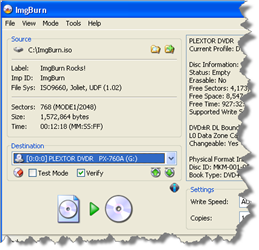
ImgBurn is a lightweight CD / DVD / HD DVD / Blu-ray burning application that everyone should have in their toolkit! All the latest drives are supported (including booktype / bitsetting on many of the major ones). Advanced functionality can be found in the ImgBurn context menus.

It has several 'Modes', each one for performing a different task:

  • Read - Read a disc to an image file
  • Build - Create an image file from files on your computer or network - or you can write the files directly to a disc
  • Write - Write an image file to a disc
  • Verify - Check a disc is 100% readable. Optionally, you can also have ImgBurn compare it against a given image file to ensure the actual data is correct
  • Discovery - Put your drive / media to the test! Used in combination with DVDInfoPro, you can check the quality of the burns your drive is producing

ImgBurn supports a wide range of image file formats - including BIN, CUE, DI, DVD, GI, IMG, ISO, MDS, NRG and PDI.

It supports Unicode folder/file names, so you shouldn't run in to any problems if you're using an international character set.

ImgBurn supports all the Windows OS's - Windows 95, 98, Me, NT4, 2000, XP, 2003, Vista and 2008 (including all the 64-bit versions). If you use Wine, it should also run on Linux and other x86-based Unixes.

It's a very flexible application with several advanced features that are often lacking in other tools, especially when it comes to burning DVD Video discs. It supports all the latest drives without the need for updates (including booktype / bitsetting / advanced settings on many of the major ones - i.e. BenQ, LiteOn, LG, NEC, Plextor, Samsung, Sony).

There is an image queue system for when you're burning several images (which you can automatically share between multiple drives if you have more than one) and an easy-to-use layer break selection screen for double layer DVD Video jobs. The Automatic Write Speed feature allows you store your favourite burn speed settings on a per 'Media ID' basis, right down to a drive by drive level. Data captured during the burn (write speed, buffer levels etc) can be displayed / analysed using DVDInfoPro.

Whilst ImgBurn is designed to work perfectly straight out of the box, advanced users will appreciate just how configurable it is.

Note from FreewareFiles: The setup program includes a toolbar which does not have to be installed to use the software.

Since version 2.5.1.0, ImgBurn adds shortcuts to your desktop which link to LiUtilities.

View the full Changelog.

  • Digg
  • Del.icio.us
  • StumbleUpon
  • Reddit
  • RSS

Size: 2.43MB
Publisher:
Visit Website
Release Date:
2010-12-01
Submit Date:
2010-12-02
OS:
Windows XP/Vista/7

Publisher's Description:

Hanso Tagger is a “must” audio tool for the keen music listener created as a convenient solution for organizing vast music collections. The program was thought out as a complex, yet, easy to use, tagging tool to help you avoid misplacing music files or having a hard time managing your music preferences.

Hanso Tagger’s tag processing capabilities cover far-reaching needs and are easily accessible to all-range users. Using an easy-to-work-with interface, Hanso Tagger carries out a bunch of various tasks – it fills in missing ID3 tag fields like title, artist, album, genre, year using portions of filenames, downloads ID3 tags via popular services like Amazon and FreeDB, exports available tags for a backup or additional processing, imports ID3 tags from a database through a CSV file (for this, Internet connection is required).

The range of formats supported by Hanso Tagger is very large (MP3, WMA, OGG, WAV, FLAC, APE, WV, M4A, AAC, MPC) and the program makes possible working simultaneous with all of them. For needs involving creating playlists, renaming files, sorting out folders, exporting info to multiple formats and more, Hanso Tagger is one of the best available solutions – tasks such as editing files, playing files, enqueuing files in winamp, loading images are made extremely easy and enjoyable.

  • Digg
  • Del.icio.us
  • StumbleUpon
  • Reddit
  • RSS

LMMS 0.4.9


Size: 21.32MB
Publisher:
Visit Website
Release Date:
2010-12-22
Submit Date:
2010-12-22
OS:
Windows 2000/XP/Vista/7

LMMS is a free cross-platform alternative to commercial programs like FL Studio®, which allow you to produce music with your computer. This includes the creation of melodies and beats, the synthesis and mixing of sounds, and arranging of samples. You can have fun with your MIDI-keyboard and much more; all in a user-friendly and modern interface.
Features

  • Song-Editor for composing songs
  • A Beat+Bassline-Editor for creating beats and basslines
  • An easy-to-use Piano-Roll for editing patterns and melodies
  • An FX mixer with 64 FX channels and arbitrary number of effects allow unlimited mixing possibilities
  • Many powerful instrument and effect-plugins out of the box
  • Full user-defined track-based automation and computer-controlled automation sources
  • Compatible with many standards such as SoundFont2, VST(i), LADSPA, GUS Patches, and MIDI
  • Import of MIDI and FLP (Fruityloops® Project) files

  • Digg
  • Del.icio.us
  • StumbleUpon
  • Reddit
  • RSS